GeoInquiries Collections
🌐Introduction to GeoInquiries Collections
GeoInquiries are short, standards-based inquiry activities for teaching map-based content found in commonly used textbooks. Each activity is designed using a common inquiry model and can be presented quickly from a single computer and projector or modified for students’ hands-on engagement. Collections of 15–20 activities per topic enhance your curriculum throughout the year. For more GeoInquiry resources, explore the “Getting to Know GeoInquiries” guide. They are free, curriculum-aligned, map-based lessons designed to support teaching across subjects like Earth Science, Environmental Science, Human Geography, and more. Built on the ArcGIS Online platform and MapMaker, they don’t require any software installation or student logins, making them extremely accessible for teachers new to geospatial tools [1].
Each GeoInquiry includes a brief, inquiry-based activity using a live, interactive web map to guide students through spatial thinking challenges. With engaging visuals and real-world data, students examine patterns and processes, compare locations, and draw evidence-based conclusions. The ‘Getting to Know GeoInquiries’ guide is an ArcGIS StoryMap. In case you want to create your own powerful storymaps, follow the course of the Map Storytelling E-module!
The GeoInquiries website, offers the following collections [2]:
- Earth Science: Teaches map-based concepts from middle and high school earth science, including topography, earthquakes, volcanoes, oceans, weather, and climate. https://esri.com
- Environmental Science: Supports map-based concepts in high school environmental science, such as speciation, pollution, population ecology, and energy. https://esri.com
- Government: Covers a range of topics including elections, federalism, rights, and comparative government. https://esri.com
- Human Geography: Focuses on human interaction with the planet, addressing concepts like urbanization, transportation, language, and religion. https://esri.com
- Mathematics: Highlights the connections between geometry, beginning algebra, and maps, using ArcGIS Online to extend core concepts. https://esri.com
- Upper Elementary: Includes cross-curricular map concepts for upper elementary grades, focusing on social studies and science Common Core State Standards. https://esri.com
- World Geography: Offers inquiry-based learning activities addressing landforms, physical processes, ecosystems, climate, vegetation, population patterns, political geography, economics, and human/environment interaction. https://esri.com
- World History: Brings historical periods and maps to life, emphasizing the spatial nature of critical events throughout world history. https://esri.com
These collections are designed to integrate seamlessly into educational curricula, providing interactive and engaging ways to explore various subjects through geographic inquiry.
🌱 Why Should Teachers Use GeoInquiries?
GeoInquiries are not just engaging digital maps and lesson plans, they are entry points for deeper, inquiry- and project-driven learning. They support:
- Green skills: By using real environmental datasets (e.g., deforestation, urban growth, sea-level rise), students begin to understand the relationships between people, ecosystems, and climate.
- Digital skills: Navigating web GIS interfaces develops data literacy, critical for the digital transformation of education. Students learn to explore layers, filter information, and read thematic maps.
- Spatial skills: GeoInquiries promote core geography and Earth science competencies, like analyzing patterns, relationships, and processes across space and time.
In this way, they directly support different competence frameworks and of course, the GEO-Academy Competence Framework (E-module 1), connected easily to the goals of Education for Sustainable Development (ESD) for transformative learning.
🌐 Linking GeoInquiries to the Living Lab methodology
As we highlighted, GeoInquiries are concise, inquiry activities, typically 15 – 45 minutes long, designed to meet science and social studies standards using interactive geospatial tools and data. Their structured format allows teachers to layer these short-lessons into broader project-based or challenge-driven activities and educational projects, effectively acting as the data exploration and framing stage of a Living Lab project. For instance:
- GeoInquiries introduce students to real-world spatial questions, such as patterns in land use, hazards like landslides, earthquakes or floods, and ecosystem changes.
- This early phase of inquiry cultivates spatial thinking, literacy with geospatial tools, with problem identification skills, critical for initiating a geospatial Living Lab, where real-world issues are further explored and acted upon through co-creative experimentation
The School Living Lab follow iterative phases, as we showed in the first lesson of this course: students should ‘feel’ the problem and discover (co-create) → design → act → evaluate, involving cross-community collaboration, stakeholder engagement, and authentic problem-solving. Here’s how GeoInquiries align with these stages:
- Co-create: GeoInquiries engage students with live spatial data (e.g., interactive maps of environmental risks), helping them ask questions and frame challenges based on real-world contexts.
- Design & Act: Using their initial insights, students move toward designing prototypes, experiments, or interventions, the hands-on, co-creative core of Living Labs.
- Evaluate: Students revisit initial GeoInquiry data or collect new evidence to assess their interventions, reflecting on effectiveness and refining their approaches.
📊 GeoInquiries Levels
Classic GeoInquiries (version 1) are available in two levels: 1 and 2.
Level 1 GeoInquiry maps require no login, no installation and will run on any computer or device. Level 1 activities are intended to help students see patterns and think spatially about the concepts in the maps. Level 1 GeoInquiries use visual analysis by the learner (see also the Cartography and Spatial Thinking E-Module for more activities).
Level 2 GeoInquiries use the analysis tools in ArcGIS Online and require learner visual interpretation of those analyses. Level 2 activities need an ArcGIS Online Organization for schools (free from Esri). You may also check the Mapstorytelling E-Module on how to contact your national provider. Using Level 2 activities and maps requires users to have at least “Publisher” permissions to use the analysis tools. Level 2 activities are only available for six of the ten GeoInquiry collections. Level 2 GeoInquiries have a distinctive banner across the top of each activity (teacher PDF). Level 2 activities are listed below the Level 1 activities.
If you need more information on how to get started with the GeoInquiries, you may take a look on the following video and the step-by-step instructions:
📊 GeoInquiries Structure
GeoInquiries are composed of multiple “key” parts: a PDF teacher guide , an interactive webmap, and an optional student worksheet. Pedagogically, GeoInquiries provide a multi-layered inquiry arc around the map and data within. These questions provide an instructional toolkit for interrogating the map spatially and conceptually [1].
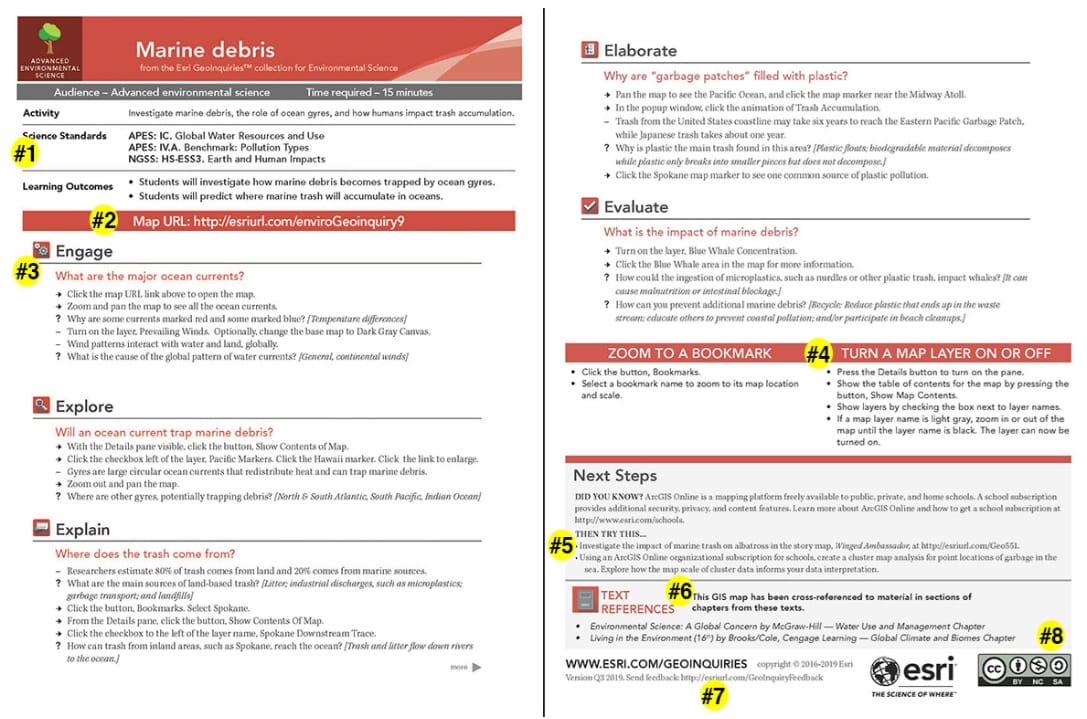
These are the key parts of a GeoInquiry teacher PDF, available in every Esri GeoInquiry (see the image below).
- Standards alignment, relevant to the content area
- Active link to the web map
- Five-stage inquiry process (5E or geographic inquiry depending on collection)
- Two “tech tip” boxes
- Activity extensions
- Common textbook alignment
- Feedback URL (also note activity version to the left)
- Creative Commons identifier
At the most basic level of teaching with GeoInquiries, a teacher displays the map on a white board in front of the classroom and verbally delivers the activities from the teacher guide. As teachers get more comfortable, many will have students load the maps on their devices, Chromebooks, or even smart phones as the teacher verbally guides the students through the inquiry. Some teachers will distribute the student worksheets and map URL, asking students to return their work at the end of the hour. Student worksheets are in a Google Doc format, allowing for easy changes and are fully accessible.
Other teachers will begin to add their own data to the GeoInquiry map (or remove data), customizing the map for the local area or a specific topic of study. Finally, some teachers create their own GeoInquiries and share with the world through ArcGIS Online.
Get started
- Practice the activity by yourself.
- Display the map on your white board.
- Use the GeoInquiry with one class.
- Consider if you prefer to use student worksheets.
- Self-reflect on what to change and what worked.
- Use the GeoInquiry with all classes.
- Download the next GeoInquiry in your curriculum sequence.
Let’s try some of the activities!
Useful links
- ESRI – GeoInquiries: Classroom activities gallery
- ESRI Schools Team: Getting to Know GeoInquiries